
1. Confirm the bag before fixing the layout
Tell us the bag format, coffee weight, material, finish and features you want. We can prepare the layout for the correct front, back, side and base panels. A photo of a bag you like helps us understand the design; we then use the drawing for your own size.
Ask us for the drawing for your approved bag size. It shows the panels, folds, seals, trim lines and artwork margins. Use those dimensions when preparing the files, or let our designers prepare the layout for you.
2. Read the design as a formed bag
Check where the logo, coffee name, net weight and supporting information land when the bag is formed and filled. Review each panel, including graphics that cross a gusset or meet a seam. Keep critical content within the agreed safe areas and review valve, zipper and opening positions with the artwork.
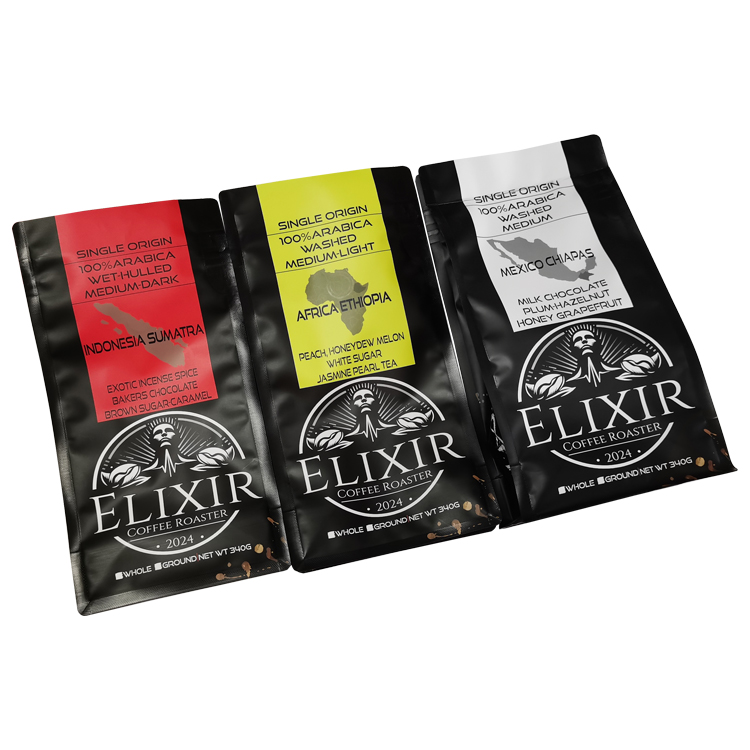
If you have several coffees, distinguish shared elements from the information that changes. Create a simple design list with a file name and revision for each coffee. Avoid approving one design and assuming the rest have the same text or panel placement.
- Identify the front, back, sides and bottom on the correct dieline.
- Check readable text away from folds, seals and specified feature areas.
- Review every design variant and each variable coding area.
3. Organize the production file
Maintain an editable master and prepare a production handoff in the agreed file format. Keep artwork separate from the dieline and identify any white ink, clear areas or special finish requirements as the print team requests. Include the images and fonts needed to reproduce the approved design.
Confirm color setup with the selected print process and material. Supply a physical reference or agreed color target if color matching matters. A bright screen preview cannot establish the appearance of ink on kraft, metallized film or a finished bag. Review resolution at the final printed size rather than judging a small on-screen thumbnail.
| File item | Review before handoff |
|---|---|
| Dieline and revision | Correct format, size and latest agreed panel/feature layout |
| Layers | Artwork separated from template information; special areas clearly identified |
| Text and images | Content checked; fonts outlined or supplied as agreed; linked images included |
| Color and finish | Agreed color setup, references and finish instructions provided |
| Design variants | One identifiable version for each coffee/design; clear change list |
4. Review the proof deliberately
Check spelling, coffee details, net quantity, contact information and any claims using your approved content. Inspect orientation and panel placement, then review the separations or special-area proof supplied for the project. Confirm that template guides will not become printed artwork.
Use the actual barcode information and test the final printed barcode where needed for your retail process. Do not invent a barcode or use a screenshot of one as final art. Confirm the proof type with the team: a layout proof, a color reference and a physical bag sample answer different questions.
5. Keep one clear approval trail
Send a single consolidated change list with the file names and revisions affected. After changes, review the updated proof rather than relying on comments attached to an earlier version. Retain the approved artwork, production-file version and bag specification together.
If your artwork is unfinished, send your logo, coffee information and design references. We offer free design with unlimited revisions. After you approve the design, we prepare the layered production files free of charge and work through any samples you need before production.
Common questions
Do I need finished artwork to ask for help?
No. Share the information you have, including your logo, coffee details and design idea. We can develop the design and provide free layered production files after you approve it.
Can I reuse a label design on a full coffee bag?
Use it as a starting point. A formed bag has its own panels, folds, seals and feature positions, so the artwork needs review on the agreed bag dieline.
Does approving a screen proof establish an exact printed color?
No. The screen, material, inks and finish can affect appearance. Confirm the appropriate color reference and physical proof or sample requirements for your project.
Put the guide into practice
Further Reading
For more background on the topics in this guide, see the resources above.
Need help with your coffee bag project?
Tell us the coffee weight, quantity and look you want. We can help you choose the bag, design the artwork for free and prepare the layered files after approval. Similar-material samples are free; custom sample fees are refunded when you place an order. Ask us about sample shipping.